

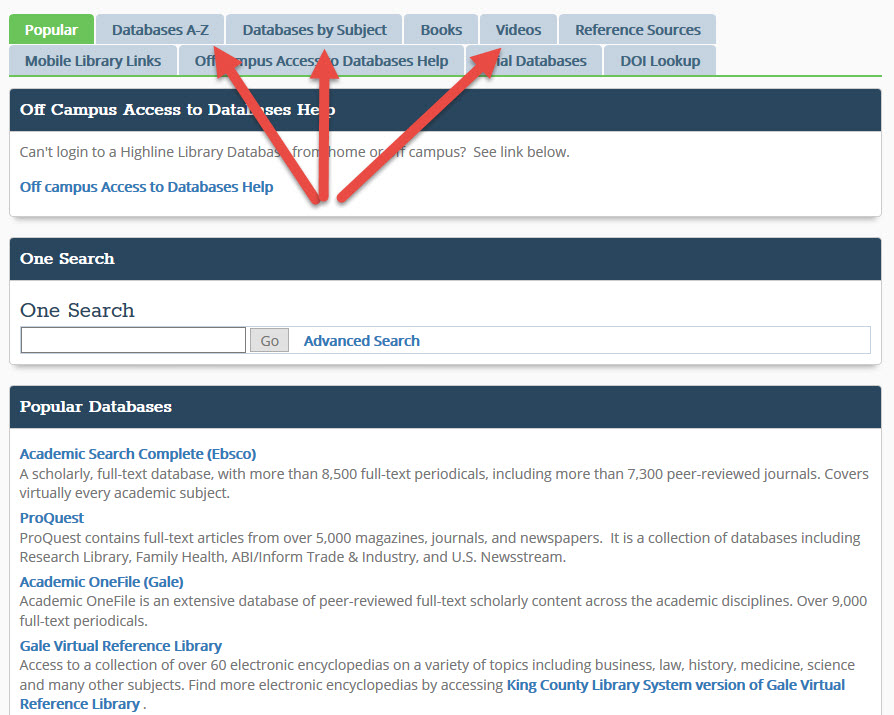
Imagine needing to find that one specific piece of information online, buried somewhere in the digital haystack. You type a simple query into a search engine, and boom—millions of results! Overwhelmed much? We've all been there. Learn how to cut through the online clutter with advanced search techniques for online research and find exactly what you need, faster. It's time to ditch the basic searches and dive into the world of Boolean operators, advanced filters, and specialized search tools.
Think of Exploring Advanced Search Techniques for Online Research as unlocking a secret weapon in your quest for knowledge. It's about becoming a digital detective, honing your skills to sniff out the precise information you're looking for. Forget sifting through endless pages of irrelevant links. This is about efficiency, accuracy, and feeling like a total boss when you nail that perfect search. Why waste hours when you can find what you need in minutes?
The true power of Exploring Advanced Search Techniques for Online Research lies in its ability to transform your online experience. We’re not just talking about finding cat videos faster (though, that’s a bonus!). We’re talking about accelerating your research, enhancing your learning, and empowering you to navigate the vast digital landscape with confidence. It's about taking control and mastering the art of information retrieval.
So, what are we waiting for? Let’s jump into the world of Exploring Advanced Search Techniques for Online Research . We'll cover everything from basic Boolean operators to specialized search engines and advanced filtering options. Get ready to level up your research game and become a master of the digital domain. It’s time to take those research skill to another level.
Mastering Boolean Operators
What are Boolean Operators?
Boolean operators – sounds intimidating, right? But trust me, they're your new best friends in the search world. Think of them as little commands that tell the search engine exactly what you're looking for. The three main players are AND, OR, and NOT.
AND: Narrows your search. It tells the search engine to only show results that contain both keywords. For example, if you search for "cats AND dogs," you'll only see results that mention both cats and dogs. OR: Broadens your search. It tells the search engine to show results that contain either keyword. So, "cats OR dogs" will show you results that mention cats, dogs, or both. NOT: Excludes keywords. It tells the search engine to exclude results that contain a specific word. For example, "apples NOT green" will show you results about apples, but not green apples.
Practical Examples
Let’s say you’re researching the impact of social media on teenagers. Here's how you can use Boolean operators:
"social media AND teenagers AND mental health": This will give you results specifically about the intersection of these three topics. "social media OR teenagers OR adolescents": This broadens your search to include any information related to social media, teenagers, or adolescents individually or in combination. "social media NOT adults": This will exclude results that focus on social media use by adults, keeping your focus on teenagers.
How to Use Boolean Operators Effectively
The key is to think like a computer . Seriously! Break down your research question into its core concepts and then use Boolean operators to connect them.
Start broad, then narrow: Begin with a broad search using OR to get a sense of the available information. Then, use AND to narrow your focus as you identify specific areas of interest. Experiment with NOT: Be careful with NOT. It can be powerful, but also exclude relevant results if you're not precise. Use parentheses for complex searches: If you have a complex search with multiple operators, use parentheses to group terms and ensure the search engine interprets your query correctly. For example: "(cats OR dogs) AND adoption."
Common Mistakes to Avoid
Forgetting to capitalize: Most search engines require Boolean operators to be in ALL CAPS. Overusing NOT: As mentioned earlier, be cautious with NOT. Double-check your results to make sure you're not excluding valuable information. Not experimenting: The best way to master Boolean operators is to practice! Try different combinations and see what works best for your research question.
Leveraging Advanced Search Filters
Okay, so you’ve got the Boolean operators down. Now, let's talk about advanced search filters. These are like the secret ingredients that take your search from good to amazing .
Exploring Google's Advanced Search
Google's advanced search is a hidden gem. You can access it by searching on Google, then clicking on “Settings” then “Advanced Search”. You can also do a quick search online for "Google Advanced Search". It's like a control panel for your searches, allowing you to specify things like:
Keywords: Words or phrases you want to include or exclude. Language: Limit results to a specific language. Region: Limit results to a specific country or region. Last Update: Find results that were updated within a specific timeframe (e.g., past 24 hours, past week, past year). File Type: Search for specific file types (e.g., PDF, DOC, PPT). Domain: Limit results to a specific website or domain (e.g., .edu, .org). Usage Rights: Find content that is free to use or share.
Why are these filters so useful?
Let’s say you’re working on a project about the history of jazz music in New Orleans. You could use the advanced search to:
Limit results to articles written in English. Search for documents published before 1950 (to find primary sources). Search for PDF files containing sheet music or historical documents. Limit results to websites from museums or universities in New Orleans.
Beyond Google: Other Search Engine Filters
Google isn't the only game in town. Other search engines offer their own advanced search filters. Here are a few examples:
DuckDuckGo: Known for its privacy focus, DuckDuckGo offers filters for region, time, and file type. Bing: Bing's advanced search allows you to filter by date, language, region, and even content safety level. Academic Search Engines (e.g., Google Scholar, JSTOR): These specialized search engines offer advanced filters specifically designed for academic research, such as publication date, author, journal, and subject area.
Tips for Maximizing Filter Effectiveness
Start with the most important filters: Identify the filters that are most critical to your research question and apply those first. Experiment and refine: Don't be afraid to adjust your filters as you go. If you're not getting the results you want, try changing the date range, language, or file type. Combine filters: Use multiple filters in combination to narrow your search and get more precise results.
Exploring Specialized Search Engines and Databases
Sometimes, general search engines just don't cut it. That's where specialized search engines and databases come in. They're like laser-focused tools designed to help you find specific types of information.
Academic Search Engines
If you're doing academic research, these are your go-to resources:
Google Scholar: Indexes scholarly literature, including journal articles, conference papers, and theses. JSTOR: A digital library of academic journals, books, and primary sources. PubMed: A database of biomedical literature. ERIC (Education Resources Information Center): A database of education research and information.
Why use academic search engines?
Access to peer-reviewed research: These search engines focus on high-quality, scholarly content. Specialized filters: They offer filters specifically designed for academic research, such as publication date, author, journal, and subject area. Citation tracking: Some academic search engines allow you to track citations and see how often a particular article has been cited by other researchers.
Subject-Specific Databases
These databases focus on specific subject areas, such as business, law, medicine, or engineering. Examples include:
LexisNexis: A database of legal and news information. Bloomberg Terminal: A real-time financial data and news platform. Web of Science: A multidisciplinary database of scholarly literature.
Benefits of subject-specific databases:
Comprehensive coverage: They provide in-depth coverage of a particular subject area. Specialized tools: They offer tools and features specifically designed for researchers in that field. Access to unique content: They may contain content that is not available through general search engines.
Open Data Repositories
These repositories provide access to publicly available data sets, such as government data, scientific data, and social science data. Examples include:
Data.gov: The U.S. government's open data portal. European Data Portal: A portal to open data from European countries. World Bank Open Data: A repository of data on development indicators.
Why use open data repositories?
Access to raw data: They provide access to the raw data behind research findings. Opportunity for analysis: You can use the data to conduct your own analyses and draw your own conclusions. Transparency and reproducibility: Open data promotes transparency and allows other researchers to reproduce your findings.
Refining Your Search Strategy
So, you’ve explored Boolean operators, advanced search filters, and specialized search engines. Now, let's talk about refining your overall search strategy. This is where you bring it all together and become a true search master.
Iterative Search Process
Think of searching as an iterative process. It's not a one-and-done deal. You start with a broad search, evaluate the results, refine your search terms, and repeat.
Start with a broad search: Begin with a simple search using your core keywords. Evaluate the results: Look at the first few pages of results. Are they relevant to your research question? What keywords are being used in the titles and descriptions? Refine your search terms: Based on your evaluation, adjust your search terms. Use Boolean operators, advanced filters, or specialized search engines to narrow your focus. Repeat: Continue refining your search terms until you're getting the results you want.
Keyword Research Techniques
Choosing the right keywords is crucial to effective searching. Here are a few techniques to help you identify the best keywords:
Brainstorming: Start by brainstorming a list of keywords related to your research question. Think about synonyms, related terms, and alternative spellings. Using a thesaurus: A thesaurus can help you find synonyms for your keywords. Analyzing search results: Look at the keywords used in the titles and descriptions of relevant search results. Using keyword research tools: There are many keyword research tools available online, such as Google Keyword Planner and SEMrush. These tools can help you identify popular keywords and related terms.
Documenting Your Search Process
Keeping track of your search process is essential for both efficiency and transparency.
Create a search log: Create a document (either digital or physical) to record your search terms, filters, and results. Note your successes and failures: Note which search terms and filters worked well and which ones didn't. Save relevant articles and websites: Save any articles or websites that are relevant to your research question. Cite your sources: Be sure to properly cite all of your sources in your final research paper or project.
Staying Updated on Search Engine Algorithms
Search engine algorithms are constantly changing. What works today may not work tomorrow. It's important to stay updated on the latest changes and best practices.
Follow search engine blogs and forums: Follow the blogs and forums of major search engines like Google and Bing. Attend search engine optimization (SEO) conferences and webinars: SEO professionals are experts in search engine algorithms. Attending their conferences and webinars can help you stay informed. Experiment and adapt: The best way to stay updated is to experiment with different search techniques and see what works.
FAQ: Addressing Common Questions
Boolean Operators
I'm confused about when to use AND, OR, and NOT. Can you give me a simple rule of thumb?
Think of AND as narrowing, OR as broadening, and NOT as excluding. AND is for when you want all the terms to be present, OR is for when any of the terms are acceptable, and NOT is for when you want to exclude a specific term. For instance, Exploring Advanced Search Techniques for Online Research is easier if you start with a broad search and narrow it down.
Do I need to capitalize Boolean operators?
Yes, most search engines require Boolean operators to be in ALL CAPS (AND, OR, NOT). This helps the search engine distinguish them from regular words.
Advanced Search Filters
Are advanced search filters available on all search engines?
No, not all search engines offer the same advanced search filters. Google, Bing, and DuckDuckGo are some of the most popular search engines that offer advanced search filters.
How often should I use advanced search filters?
Use advanced search filters whenever you need to narrow your search and get more precise results. They're especially helpful when you're dealing with a large number of search results or when you're looking for a specific type of information. Exploring Advanced Search Techniques for Online Research always benefits from judicious use of filters.
Specialized Search Engines and Databases
How do I know which specialized search engine or database to use?
The best way to choose a specialized search engine or database is to consider your research topic and the type of information you're looking for. If you're doing academic research, start with academic search engines like Google Scholar or JSTOR. If you're looking for legal information, try LexisNexis. Exploring Advanced Search Techniques for Online Research requires choosing the right tool for the job.
Are specialized search engines and databases free to use?
Some specialized search engines and databases are free to use, while others require a subscription. Many academic libraries offer access to subscription-based databases for their students and faculty.
General Tips
What's the biggest mistake people make when searching online?
One of the biggest mistakes is using too few keywords or using keywords that are too broad. Be specific and use a variety of keywords to narrow your search.
How can I improve my search skills?
Practice! The more you search, the better you'll become at identifying the right keywords, using Boolean operators, and leveraging advanced search filters. Also, stay updated on the latest search engine algorithms and best practices. Exploring Advanced Search Techniques for Online Research is a journey, not a destination.
Conclusion: Embracing the Power of Advanced Search
So, we've journeyed through the world of Exploring Advanced Search Techniques for Online Research , from mastering Boolean operators to leveraging advanced filters and specialized search engines. It might seem like a lot to take in, but the truth is, these skills are essential for anyone who wants to navigate the vast digital landscape effectively.
The motivation behind mastering these techniques is simple: time is precious. Why spend hours sifting through irrelevant search results when you can find exactly what you need in minutes? By honing your search skills, you can become more efficient, more accurate, and more confident in your online research.
Throughout this exploration, I've experienced moments of frustration (those pesky Boolean operators!) and moments of triumph (when that perfect search finally yields the perfect result!). But the overall feeling is one of empowerment. Knowing that I can find the information I need, when I need it, is a valuable skill in today's digital age.
The key takeaway is that Exploring Advanced Search Techniques for Online Research is an ongoing process. Search engine algorithms are constantly changing, and new tools and resources are always emerging. The best way to stay ahead of the curve is to stay curious, stay informed, and keep practicing. So go forth, explore, and become a master of the digital domain! Happy searching!
